Rob Golding

Technology Consultant

Ubuntu and The University of Nottingham’s Proxy

I have recently enrolled on a Computer Science course at The University of Nottingham, and as such have had to make sure my machines correctly use their proxy server for web access. This post outlines the process of configuring Ubuntu for exactly that purpose - and could be applied to any network with a similar layout.

Network Proxy

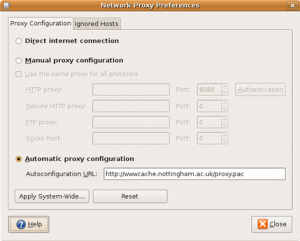
First and foremost, Ubuntu has a setting in gnome for the Network Proxy, which should set gnome's proxy - but I can't see as it affects anything at all - still, better to be safe than sorry.

At Nottingham University, the recommended configuration is a proxy auto-configuration script (proxy.pac) which is downloaded by the client and parsed to configure the appropriate proxy server. In this case, it is located at http://wwwcache.nottingham.ac.uk/proxy.pac. This URL is entered into the correct field of the gnome Network Proxy settings dialogue.
Terminal Proxy

Secondly, the terminal has a proxy configuration option, so that programs that run inside the terminal making HTTP requests can access the internet - namely wget and aptitude. This is slightly more difficult to configure than the previous, and is achieved like so:

The terminal proxy is set using a variable called http_proxy, which is set using the export command, i.e.

export http_proxy="http://proxy_server_ip:port"

In this case, the proxy server's IP and port for the SNS (Student Network Service) is 128.243.253.119:8080.

This change can be made permanent by editing /etc/bash.bashrc, and adding the above line to the end of the file. Otherwise, the change is only effective in the terminal window currently open by the user, and disappears when it is closed.

Synaptic

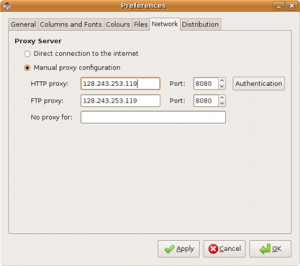
Lastly, Synaptic Package Manager must have the proxy set, in order to update your installation using the in-built Update Manager or Synaptic GUI. This is done by opening Synaptic, and choosing Settings, Preferences, and setting the above proxy information using the Network tab. Unfortunately Synaptic cannot read auto-configuration scripts, so the IP and port must be manually entered here.
Obviously once all this is done, Firefox must be configured to use the correct proxy - but I trust you know how to do that! This turns out to be quite a pain, so I'll be looking at ways to do this in one fell swoop. If anyone has any suggestions, then please let me know.

Note: These changes can be made much less painful by adding an entry to the hosts file for each of the proxy IPs you need to configure - so you only need to type the word proxy for example, instead of the entire IP. I will document this process shortly in a separate post.

Categories: Life, Linux, Technology, university | | RSS 2.0

  • Jay
    Nice one mate, thanks!

    Just a minor syntax correction - you need to get rid of those double quotes in the bash configuration command. Correct syntax is:

    export http_proxy=http://snsproxy.nottingham.ac.uk:8080
  • Panikos
    Best method for large files (and overcoming other limitations) is to tunnel through the proxy. As to the details of how i wont go into that because if you cant figure it out i think you shouldnt be trying it to begin with. several ways are possible though.

    in answer to how i got the list of ips for the finjan proxies = trial and error + some scripting.

    the easiest possible solution is to set wwwcache.nottingham.ac.uk/proxy.pac then visit something like whatismyip.com and keep refreshing, lol!!
  • john
    Trying to download my £30 copy of windows 7 pro from http://www.microsoft.com/student/discounts/theu... but the nottingham system won't let me download anything over 1gb.....and the lady on the phone at sns help basically giggled and said there's no way I'm getting that file. Well of course there is a way I can get it, but I'd rather SNS supported legitimate downloads of microsoft promotions.
  • John
    Last year was so frustrating because everyone had paid full whack for their connection, but noone was getting an adequate service. There was seemingly no feedback or customer satisfaction requests from SNS, and indeed no official guarantees of service provision, unlike broadband companies. It SNS got cut off for say 2 weeks due to staff incompetence (or lack of forward planning) it would be interesting to see whether students could reclaim some of their SNS fee.

    Sure, it's no easy task to run a network for X 000s of students, but I would think that reliable and fast internet provision is one of the most sought after facilities that prospective students look for. If we were able to create a high profile campaign along the lines of 'facebook won't work at nottingham uni' etc then you can be sure the senior management would start investing in hardware.

    This year hasn't been too bad, but the system's definitely starting to slow down a bit at key points. If there's any drastic changes I'll report here.
  • John
    Interesting discussion. I used snsproxy all of last year, found it in some obscure sns doc, but they didn't tell everyone about it. I've lived on campus many years and 08/09 was rock bottom for network reliability. SNS basically admitted with facebook/youtube/iplayer they couldn't cope. In the last few days things have got worse. The finjan scanners are terrible, they frequenty hang on file downloads, and SNS are a real pain to deal with. There are some clued up employees (Darren W) but most are typically useless. I stopped using auto proxy detect on firefox ages ago because there was a DNS hanging bug, as documented here http://kera.name/articles/2009/02/
  • Hey,

    Just writing this here in case anyone is following this guide and still having problems, for 09/10 instead of 128.243.253.119:8080 use snsproxy.nottingham.ac.uk:8080

    Hope that helps someone,

    Cheers, Alex.
  • Panikos
    The Finjan proxies seem to be:
    128.243.253.109
    128.243.253.111
    128.243.253.112
    128.243.253.113
    128.243.253.114
    128.243.253.119

    They all work with varying degrees of success throughout the day (no load balancing?). Often timeout, are really slow, or get stuck on "scanning" phase during file downloads.

    One more point to note is that if you need ftp access you might have to set:

    export “ftp_proxy=http://proxy_server_ip:port”

    alternatively you can add this to your personal bash_login so they are implemented whenever you open a shell, or to the bash default conf file so that they are applied to all user accounts on bash login.
  • tikkis
    (Try googling 128.243.253.119 and youll get only 3 results - 2 being from this blog and 1 from my post at ubuntu community.)
  • tikkis
    Ditto the above - the university helpline are clueless! They kept telling me to enter wwwcache.nottingham.ac.uk as a proxy server and 3128 as a port. Both being outdated which is why nothing worked! Moreover, the same outdated information is still at the university website, its been months since they\\\\\\\'ve changed the proxy but noone bothered to update the info. (Try googling \\\\
  • aurelien
    Thanks for this. I have been struggling for a month! I could not use synaptic or the update manager. You should definitely send this to the people of student IT support because they did not have a clue.

    Cheers,

    Aurélien
blog comments powered by Disqus