Active Directory Practices
11 January 2008
As a matter of curiosity more than anything, I often wonder whether other people's methods and practices for setting up AD are similar to my own. I will explain as best I can my own procedure, in an attempt to see how it compares to the rest of the IT community.
Firstly, I install DNS on the Domain Controller to-be. I don't do any configuration on the service, just install it. Then, running DCPromo, I allow the wizard to configure the DNS Service for me. This makes sure that the two separate zones will be present - _msdcs.domain.name, and domain.name. This seems much neater to me, and I like to see this result - so I allow the wizard to take care of it.
When the domain is installed, the first thing I usually do is open up the default domain policy and remove all the password complexity options. These are usually just an annoyance - and unless the network has any particular security needs, I disable them all. Maybe leaving the length value at 6 if it's inappropriate to turn it off completely. I like managing GPO's from the Group Policy Management Console (GPMC), so that usually gets installed straight away.
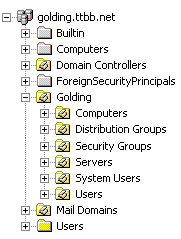
In regard to the structure of the domain, I make an OU with the domain's Netbios name in the root, and under that I create some OU's as follows:
- Computers
- Distribution Groups (If Exchange will be installed)
- Security Groups
- Servers
- Exchange Servers (for a special shutdown script)
- System Users
- Users
As for an explanation for that Exchange Servers OU, I make a shutdown script to stop all the exchange servers when it shuts down, to make the process a hundred times faster. I am so impressed by this technique, it works flawlessly every time. This OU allows me to assign the shutdown script via GPO to all Exchange Servers in the domain. Note that the DC stays in its own Domain Controllers OU that is created by the system automatically.
I guess at this point I'm feeling like I should do a backup of the DC. DHCP servers need authorizing, and Remote Desktop needs configuring. When that's done, we're basically there. Get the clients joined to the domain and we're off!
I have no idea whether my procedure is similar to anyone elses, or in any way superior (or indeed inferior) to others. Give me some opinions anyway, it will be interesting to hear from the rest of the community.